
Interactive Surveys
Multi-type consultation questionnaires designed specifically for planning consultations. Collect structured, meaningful feedback from residents, stakeholders and community groups with an intuitive online survey tool that requires no coding or technical expertise. Whether you are running a consultation on a small planning application or a borough-wide local plan, ConsultOnline makes it simple to create, distribute and analyse survey responses at scale.
Drag-and-Drop Builder
Visually design surveys by dragging questions into place, grouping them into sections and configuring validation rules without code. Teams can build and edit questionnaires in the platform, which may reduce reliance on external support. Actual preparation time depends on survey complexity, content review and approvals.
11 Question Types
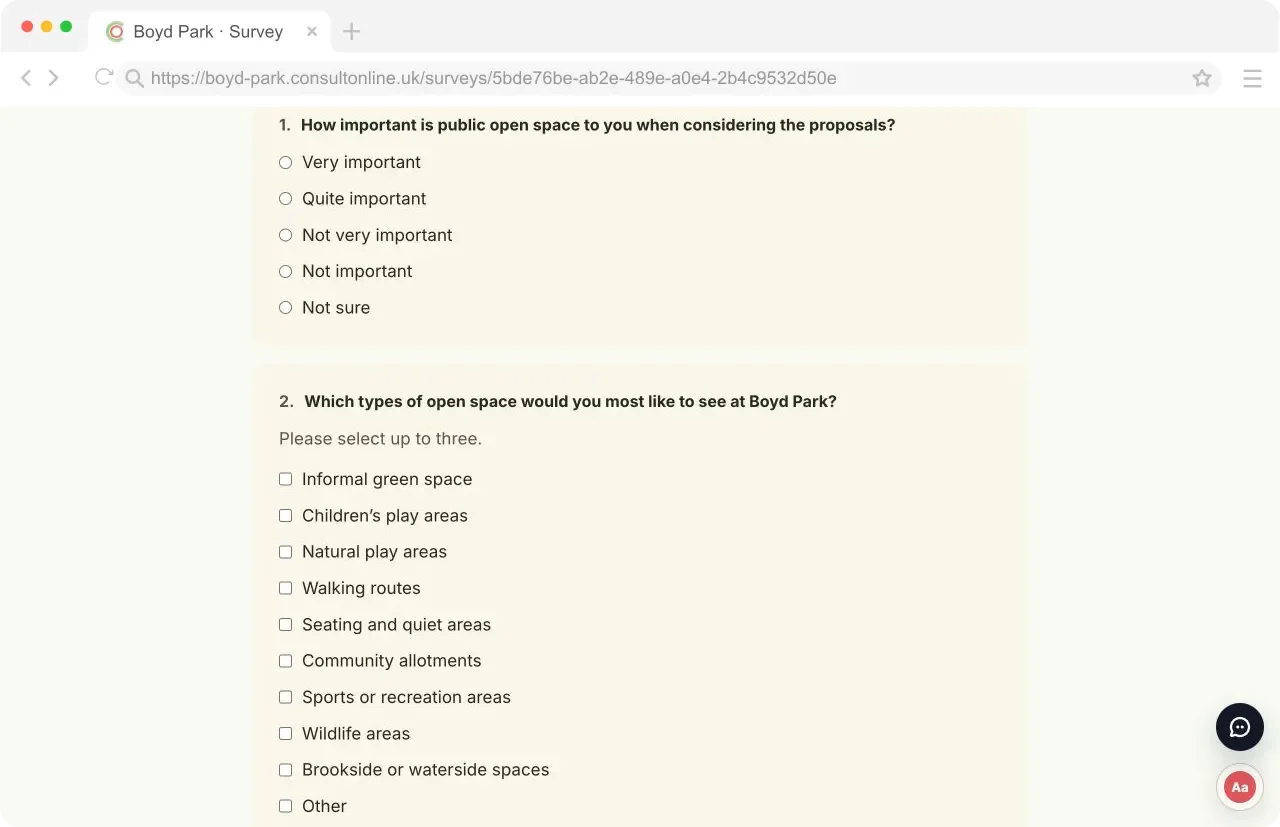
From simple short text inputs and long-form comment boxes to star ratings, linear scales, checkbox groups, radio buttons, dropdowns and file uploads, every question type is purpose-built for community. Conditional branching lets you show or hide questions based on previous answers, keeping your survey relevant and focused for each respondent.
Real-time Collection
Recorded responses can appear in dashboard views as they are processed, allowing teams to monitor participation and emerging patterns during the consultation. These indicators may inform outreach changes, but they do not guarantee improved response rates or a representative sample.
Why ConsultOnline
Why choose ConsultOnline for your consultation surveys?
Paper questionnaires and generic survey tools can create extra work for distribution, data entry and reporting. A purpose-built online survey can simplify collection while remaining part of a wider, inclusive consultation approach.
ConsultOnline’s survey templates are designed to support WCAG 2.1 AA and responsive use across phones, tablets and desktops. Data is stored in European data centres, with controls for retention and data-subject requests. Your published content, configuration and processing decisions remain part of the accessibility and data-protection assessment.
Moving some response collection online can reduce printing, postage and manual data entry. Actual participation and time savings depend on the audience, promotion, survey design and consultation process.
How It Works
Three steps to better feedback
Create Your Survey
Use the drag-and-drop builder to assemble a questionnaire without code. Choose from 11 question types, configure conditional logic, organise questions into sections and add validation rules that can help collect consistent, structured data. Preview the survey before publishing and duplicate existing surveys for recurring consultations. Build and review time depends on the questionnaire and approval process.
Share the Link
Publish the survey on a branded consultation microsite alongside maps, documents and timelines. Share a direct link through newsletters, social media or printed QR codes or embed it in another website. Each survey has a unique URL and uses responsive layouts tested on representative devices and browsers.
Analyse Responses
View recorded results in dashboard charts and draft summaries, subject to processing and data-quality limits. Filter available responses and export data for further analysis, or generate draft PDF report content. Review completeness, automated analysis, calculations, accessibility and the committee or board requirements before formal use.
See how ConsultOnline can work for your team
Book a short demo to see the survey builder in action, or explore our pricing to find the right plan for your organisation.
Capabilities
Every question type you need
Our consultation survey builder includes a comprehensive range of question types and configuration options, giving you full control over how you collect community feedback.
Question Types
Question types explained
Each question type in the ConsultOnline survey builder has been designed for the kinds of feedback that planning consultations need to collect. Here is what each one does and when to use it.
Short Text
Suitable for brief answers such as postcodes, street names or short opinions. Character limits and validation patterns can help collect responses in a consistent format. These fields can be used for demographic questions and site references where appropriate.
Long Text
A multi-line text area for detailed written comments and open-ended feedback. Perfect for capturing resident views on planning proposals, objections or suggestions. Supports optional word count limits to guide respondents towards concise, focused answers.
Rating Scale
Star-based or numeric rating questions that make it easy for residents to express satisfaction levels or preferences. Useful for gauging community sentiment on specific aspects of a proposal, such as design quality, traffic impact or environmental concerns.
Linear Scale
A numbered scale from 1 to 10 with customisable labels at each end. Excellent for measuring strength of opinion, such as "How strongly do you support or oppose this proposal?" Produces clean quantitative data that is straightforward to analyse and present to committees.
Checkbox (Select Many)
Allow respondents to select multiple options from a list. Use this for questions like "Which community facilities are most important to you?" or "Select all transport modes you use regularly." Supports minimum and maximum selection limits.
Radio Button (Select One)
Single-choice questions presented as radio buttons for clear, unambiguous responses. Ideal for yes/no questions, preference ranking or asking residents to choose between discrete options such as proposed design variants or site layout alternatives.
Dropdown Select
A compact dropdown menu for single-choice answers, particularly useful when you have a long list of options. Common uses include selecting a ward, parish or neighbourhood area or choosing from a list of predefined categories for feedback classification.
File Upload
Where enabled, respondents can attach supported documents, photographs or plans. File-type and size restrictions can reduce unwanted uploads but do not establish relevance, safety or evidential value; teams should review attachments and apply appropriate security controls.
Conditional Logic
Show or hide questions based on how a respondent answers previous questions. This keeps surveys concise and relevant — residents who support a proposal might see different follow-up questions than those who object. Branching logic reduces survey abandonment and improves the quality of responses collected.
FAQ
Frequently asked questions
Ready to collect better feedback?
Build a consultation website and start gathering structured responses. Launch timing depends on content, accessibility review, approvals and project configuration.
More features to discover